
Logging and Monitoring
LakeXpress uses two logging systems: a database for structured export tracking and log files for operational details.
Database Logging
The export tracking database (SQL Server, PostgreSQL, or SQLite) records all export activity for reporting and troubleshooting.
Database Schema Overview
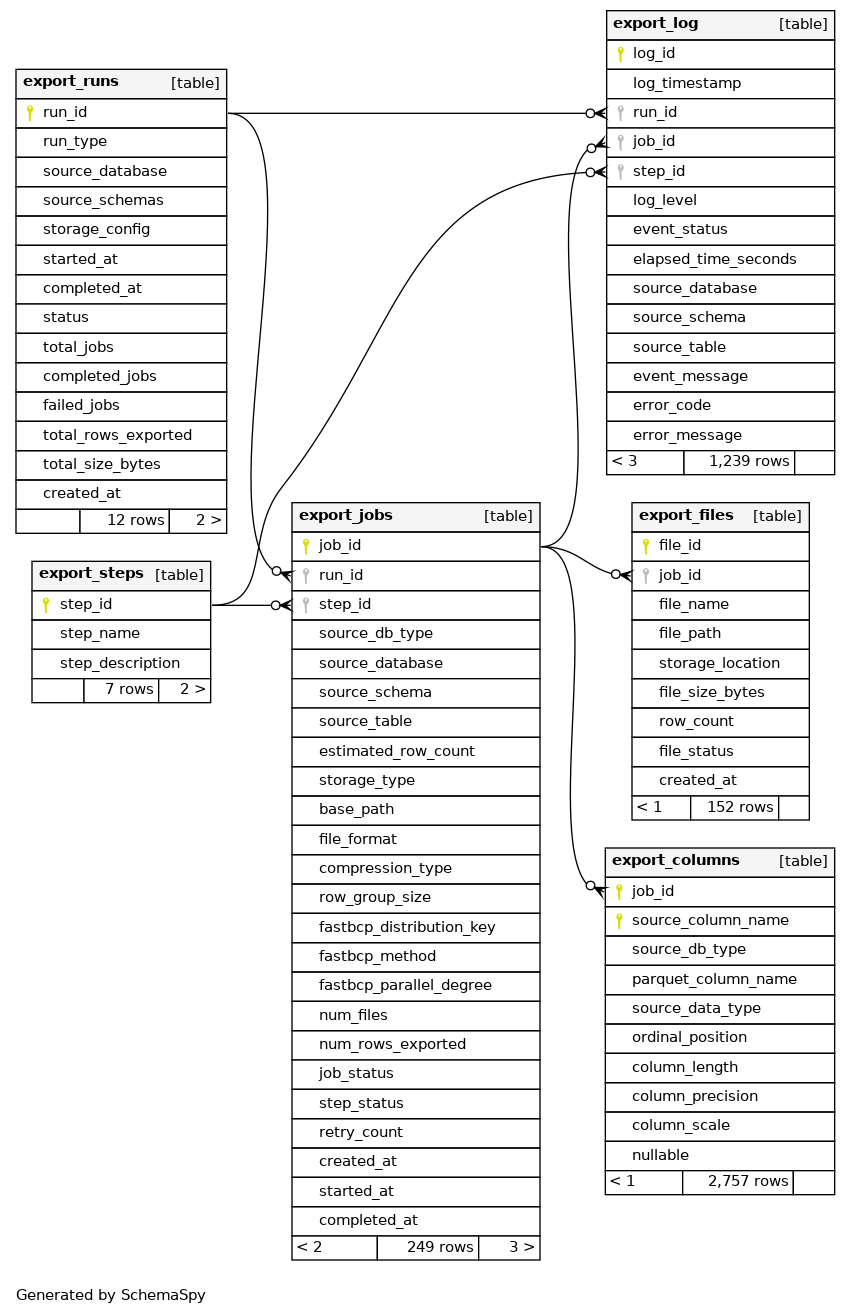
Click image to view full size. Primary keys are marked with ● symbols and relationships show cardinality (1:N).
Key Tables
export_runs
Top-level record per export run:
- Unique run identifier
- Run type (full, incremental, custom)
- Source database and schema
- Storage configuration
- Start/completion timestamps and status
- Aggregate metrics (total, completed, failed jobs)
- Total rows exported and storage size
export_jobs
Per-table export job tracking:
- Job ID and associated run_id
- Step ID linking to export_steps
- Source table details (database, schema, table)
- Storage settings (type, path, format, compression)
- Parquet settings (row group size)
- FastBCP settings (distribution key, method, parallel degree)
- Results (file count, rows exported)
- Status (job_status, step_status)
- Retry count and timestamps (created, started, completed)
export_steps
Workflow step definitions:
- Step names and descriptions
- Links to jobs and log entries
export_files
Per-file tracking for generated Parquet files:
- File ID linked to parent job
- File name and full path
- Storage location (local, S3, Azure, GCS)
- File size, row count, status, creation timestamp
export_columns
Column metadata per exported table:
- Job ID + source column name (composite PK)
- Source database type
- Parquet column name (post-transformation)
- Source data type, precision, scale
- Ordinal position, length, nullability
export_log
Event log:
- Log ID and timestamp
- Links to run_id, job_id, step_id
- Log level (INFO, WARNING, ERROR, DEBUG)
- Event status, elapsed time (seconds)
- Source table context (database, schema, table)
- Event/error messages and error codes
partition_columns
FastBCP partitioning configuration:
- Partition config ID
- Source table identification (db type, database, schema, table)
- FastBCP distribution key, method, parallel degree
- Environment name, enable/disable flag
- Description and audit timestamps
File-Based Logging
Each run creates a log file named:
lakexpress_YYYYMMDD_HHMMSS_<run_id>.log
Log Format
Structured format with timestamp, log level, process ID, and context:
[YYYY-MM-DD HH:MM:SS.fff+TZ :: LEVEL :: PID :: Context] Message
Sample Log Output
[2025-11-05 10:15:23.145+01:00 :: INFO :: 12345 :: MainProcess] Log file path: /var/log/lakexpress/lakexpress_20251105_101523_a1b2c3d4-e5f6-4a7b-8c9d-0e1f2a3b4c5d.log
[2025-11-05 10:15:23.146+01:00 :: INFO :: 12345 :: MainProcess] **** Starting export run ****
[2025-11-05 10:15:23.147+01:00 :: INFO :: 12345 :: MainProcess] Source: SQLServer - salesdb.dbo
[2025-11-05 10:15:23.148+01:00 :: INFO :: 12345 :: MainProcess] Target storage: S3 - s3://data-lake/exports/
[2025-11-05 10:15:23.250+01:00 :: INFO :: 12345 :: MainProcess] Discovered 15 tables for export
[2025-11-05 10:15:23.385+01:00 :: INFO :: 12345 :: Worker-1] Exporting table: orders (estimated 1.2M rows)
[2025-11-05 10:15:45.721+01:00 :: INFO :: 12345 :: Worker-1] Export completed: orders - 1,234,567 rows in 8 files (245 MB)
[2025-11-05 10:15:45.722+01:00 :: INFO :: 12345 :: Worker-1] Export elapsed time: 22.337 seconds
Log Levels
Set via --log-level:
- INFO: Progress, row counts, operational messages
- WARNING: Non-critical issues (schema differences, type conversions)
- ERROR: Failures preventing a table export
- DEBUG: SQL queries, file operations, diagnostics
- CRITICAL: Fatal errors stopping the run
Log Location
Defaults to the current working directory. Override with --log-dir:
./lakexpress --log-dir /var/log/lakexpress export ...
Terminal Output
Logs also appear in the terminal, color-coded:
- Green: success
- Yellow: warnings
- Red: errors
- Cyan: info