
CLI Reference
Complete reference for all MigratorXpress command-line arguments.
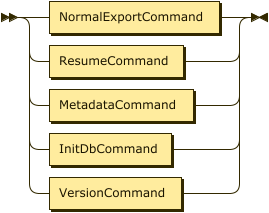
Command Syntax
MigratorXpress runs on both Windows and Linux with platform-specific binaries:
- Windows:
MigratorXpress.exe - Linux:
MigratorXpress
Arguments
Authentication
| Argument | Description | Example |
|---|---|---|
--auth |
Path to JSON file containing database credentials | /path/to/credentials.json |
Source Database
| Argument | Description | Example |
|---|---|---|
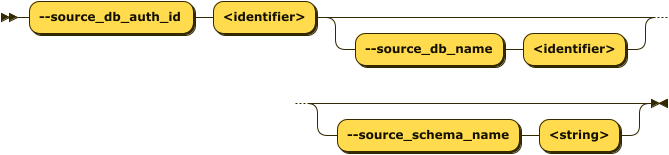
--source_db_auth_id |
ID of source database in credentials file | ds_08_oracle |
--source_db_name |
Source database name | orclpdb1 |
--source_schema_name |
Source schema name or SQL LIKE pattern (v0.6.12+) | TPCH_IN or APP_% |
Schema Selection Options:
- Single schema: Specify exact schema name (e.g.,
"SALES") - Pattern matching (v0.6.12+): Use SQL LIKE wildcards for multi-schema migration
%matches any sequence of characters_matches any single character- Comma-separated patterns supported (e.g.,
"APP_%, TENANT_%")
- All schemas: Omit
--source_schema_nameto migrate all visible schemas
Schema Pattern Examples:
✅ Single Schema:
--source_schema_name "SALES"
✅ Pattern - All schemas with prefix:
--source_schema_name "APP_%"
# Matches: APP_SALES, APP_HR, APP_INVENTORY, etc.
✅ Pattern - Schemas containing text:
--source_schema_name "%PROD%"
# Matches: SALES_PROD, PROD_ARCHIVE, MY_PROD_DATA, etc.
✅ Pattern - Year-based schemas:
--source_schema_name "DATA_2024%"
# Matches: DATA_2024_Q1, DATA_2024_Q2, DATA_2024_Q3, DATA_2024_Q4
✅ Multiple patterns:
--source_schema_name "APP_%, TENANT_%"
# Matches all schemas starting with APP_ OR TENANT_
Multi-Schema Migration Behavior (v0.6.12+):
- Each matched schema is migrated independently
- Target schemas are automatically created if they don’t exist
- Target schema names match source schema names (e.g.,
APP_SALES→APP_SALES) - All schemas share a single
run_idfor tracking - Migration tasks execute sequentially for each schema
- Use
--target_schema_nameonly for single schema migrations (not patterns)
Target Database
| Argument | Description | Example |
|---|---|---|
--target_db_auth_id |
ID of target database in credentials file | ds_04_pg |
--target_db_name |
Target database name | tpch |
--target_schema_name |
Target schema name | tpch_1_copy |
- If no target schema name is given, it defaults to the same as the source schema name (e.g., if
source_schema_name=tpchthentarget_schema_name=tpch). - If the target schema does not exist in the target database, MigratorXpress will create it.
Migration Database
| Argument | Description | Example |
|---|---|---|
--migration_db_auth_id |
ID of migration tracking database | ds_02_ms |
- This is the database where migration activities will be logged.
FastTransfer
| Argument | Description | Example |
|---|---|---|
--fasttransfer_dir_path |
Path to FastTransfer binary directory | /path/to/FastTransfer_linux-x64_v0.12.4/ |
- This is required for
transfertasks
Resume Operations
| Argument | Description | Example |
|---|---|---|
-r, --resume |
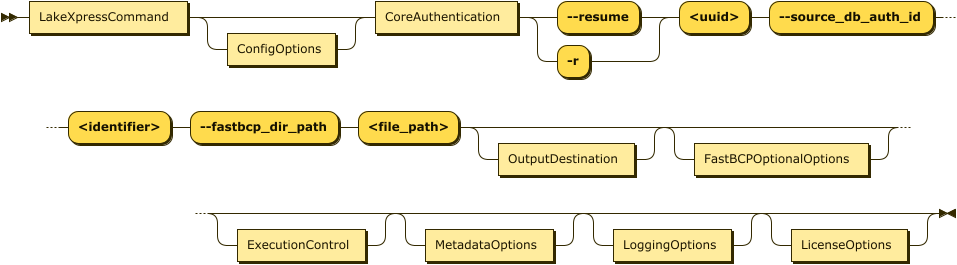
Resume a previously interrupted migration using the run ID | -r 2f73b4d0-8647-11ef-8089-c403a82a4577 |
- Use this option to continue a migration that was interrupted or failed
- The run ID can be found in the migration logs or database tracking tables
- When resuming, only specify the
--resumeargument and--migration_db_auth_id - All other parameters are retrieved from the stored migration state
Run Tagging (v0.6.30+)
| Argument | Description | Example |
|---|---|---|
--project |
Optional project tag attached to every row this run writes in the migration tracking DB | --project bob_bods_oracle |
- Stored alongside
run_idin thesourcetargetloads,eventlog, andsourcetargetdifftables -
Lets you group runs that belong to the same engagement and retrieve them later with a single SQL filter:
SELECT DISTINCT eventrunid FROM eventlog WHERE project = 'bob_bods_oracle'; - Validation: 1–64 characters, letters/digits/underscore/hyphen only (e.g.
bob_bods_oracle,cust-2026-q2). Invalid values are rejected at CLI parse time. - Optional and nullable — runs without
--projectstoreNULLin the column. Fully backward compatible; existing tracking databases are auto-upgraded with the new columns on startup. - Also accepted by
mxp_init(discovery step). - Ignored with a warning on
--resume: the project tag of the original run is inherited so a givenrun_idcarries a single, immutable tag across the full run and any resumes.
Utility
| Argument | Description | Example |
|---|---|---|
--version |
Display MigratorXpress version and exit | ./MigratorXpress --version |
- Shows the current version of MigratorXpress
- Exits immediately after displaying version information
- Useful for verifying installation and checking compatibility
License Management (v0.6.12+)
| Argument | Description | Example |
|---|---|---|
--license |
License text (ECDSA signed) | --license "LICENSE_TEXT_HERE" |
--license_file |
Path to license file | --license_file /path/to/license.key |
License Validation:
- MigratorXpress uses ECDSA-based cryptographic license validation
- Licenses are digitally signed and cannot be forged or modified
- Trial mode is available when no license is provided
- All features available in both licensed and trial modes
License Provision Methods (in order of precedence):
- Command line (license text): Use
--licenseparameter with license text - Command line (license file): Use
--license_fileparameter with file path - Environment variable: Set
MIGRATORXPRESS_LICENSEenvironment variable - Default license file: Place license in platform-specific directory:
- Linux/Mac:
~/.migratorxpress/license.key - Windows:
%APPDATA%/MigratorXpress/license.key
- Linux/Mac:
- Trial mode: Automatic fallback when no license found
Trial Mode:
- Activated automatically when no license is provided
- All features available without restrictions
- Suitable for evaluation and non-production use
- For production deployments, obtain a valid license from Architecture & Performance
Examples:
# Using license text (Unix/Linux)
./MigratorXpress --license "YOUR_LICENSE_TEXT" --auth credentials.json ...

# Using license file (Unix/Linux)
./MigratorXpress --license_file /etc/migratorxpress/license.key --auth credentials.json ...

# Using environment variable (Unix/Linux)
export MIGRATORXPRESS_LICENSE="YOUR_LICENSE_TEXT"
./MigratorXpress --auth credentials.json ...

# Trial mode (no license argument needed)
./MigratorXpress --auth credentials.json ...
Windows PowerShell Examples:
# Using license file (Windows)
.\MigratorXpress.exe --license_file C:\migratorxpress\license.key --auth credentials.json ...

# Using environment variable (Windows)
$env:MIGRATORXPRESS_LICENSE="YOUR_LICENSE_TEXT"
.\MigratorXpress.exe --auth credentials.json ...

# Trial mode (Windows)
.\MigratorXpress.exe --auth credentials.json ...
Task Control
| Argument | Description | Options |
|---|---|---|
--task_list |
Space-separated list of tasks to execute | See Task Types |
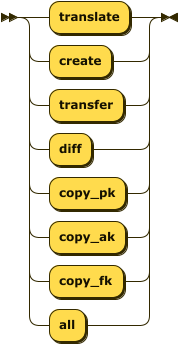
- This is the list of tasks to be performed:
translate,create,transfer,diff,copy_pk,copy_ak,copy_fk. Note that there are dependencies between these tasks. For example, you cannot create a table if you have not translated the column data types first, and you cannot transfer data if the target table has not been created beforehand, either by MigratorXpress or manually. The task order given above is the natural sequential order.
Performance

| Argument | Description | Default | Example |
|---|---|---|---|
--n_jobs |
Number of parallel jobs for processing | 1 | 2 |
--fasttransfer_p |
Number of parallel threads for FastTransfer | 1 | 2 |
--ft_large_table_th |
Row count threshold for FastTransfer parallel methods. Tables below this use standard transfer, above use database-specific parallel methods (Ctid/Rowid/NZDataSlice) | 250,000,000 | 100000000 |
--compute_nbrows |
Compute exact row counts instead of using database estimates | false |
true |
--without_xid |
Disable transaction ID usage in Netezza or Oracle during data transfer | false |
--without_xid |
FastTransfer Method Selection:
- Tables with row count <
ft_large_table_th: Uses standard method (--method "None") - Tables with row count ≥
ft_large_table_thandfasttransfer_p> 1:- PostgreSQL: Uses
--method "Ctid"with parallel degree - Oracle: Uses
--method "Rowid"with parallel degree - Netezza: Uses
--method "NZDataSlice"with parallel degree - SQL Server: Uses default FastTransfer behavior
- PostgreSQL: Uses
- If
fasttransfer_p≤ 1, standard method is used regardless of table size
Row Count Behavior:
- By default (
--compute_nbrows false): Uses database statistics/estimates for row counts (faster) - With
--compute_nbrows true: Executes COUNT(*) queries to get exact row counts (slower but accurate) - Row counts affect:
- FastTransfer method selection based on
ft_large_table_th - Columnstore index creation based on
cci_thresholdandaci_threshold - Table filtering with
--min_rowsand--max_rows
- FastTransfer method selection based on
Transaction ID Usage:
- By default, MigratorXpress uses transaction IDs (XIDs) for data consistency in Netezza and Oracle
- Use
--without_xidto disable this feature if it causes performance issues or compatibility problems - Only affects Netezza and Oracle source databases
Table Discovery Optimization (v0.6.12+):
- Table filtering is now optimized by pushing predicates to SQL level
--include_tables,--exclude_tables,--min_rows, and--max_rowsare applied as SQL WHERE clauses- Performance improvement: 10-100x faster discovery for databases with thousands of tables
- Memory efficiency: Only matching tables’ metadata retrieved from database
- Applies to all source database types: Oracle, PostgreSQL, SQL Server, Netezza
- Example: Discovering 2 tables from a schema with 2000+ tables now takes seconds instead of 13+ minutes
Table Filtering

| Argument | Description | Example |
|---|---|---|
-i, --include_tables |
Include only tables matching SQL LIKE patterns (comma-separated) | See examples below |
-e, --exclude_tables |
Exclude tables matching SQL LIKE patterns (comma-separated) | See examples below |
--min_rows |
Include only tables with at least this many rows | 1000 |
--max_rows |
Include only tables with at most this many rows | 10000000 |
Table Pattern Examples:
✅ Correct Usage:
# Single pattern
-i "PROD_%"

# Multiple patterns - quote the entire comma-separated list
-i "%TPROD%,%TDEV%"

# Multiple patterns with spaces (also valid - spaces are trimmed)
-i "%TPROD%, %TDEV%"

# Exclude pattern examples
-e "Z%,pg%"
-e "tmp_%, test_%"
❌ Incorrect Usage:
# Don't quote each pattern separately - shell interprets as multiple arguments
-i '%TPROD%','%TDEV%'  # WRONG

# Don't use double %% - SQL LIKE uses single %
-i "%%TPROD%%"  # WRONG
Pattern Matching Notes:
- Uses SQL LIKE syntax:
%matches any characters,_matches a single character - Whitespace handling: Spaces after commas in pattern lists are acceptable and automatically trimmed
- Quote the entire comma-separated string as one argument to the shell
- Patterns are case-sensitive (depends on database collation)
- Default for
--include_tablesis%(includes all tables) - Default for
--exclude_tablesis none (excludes no tables) - Exclude patterns are applied after include patterns
Migration Options
| Argument | Description | Default | Options |
|---|---|---|---|
--drop_tables_if_exists |
Drop target tables before creation | false |
true, false |
--load_mode |
Data loading mode for the transfer step (v0.6.24+) | truncate |
truncate, append |
--migration_db_mode |
How to handle migration tracking data | preserve |
preserve, truncate, drop |
--basic_diff |
Perform basic diff (row count, column count only) instead of full data comparison | false |
--basic_diff |
Load Mode (v0.6.24+):
truncate(default): Clears the target table before loading data. This is the safest option for full migrations, ensuring the target table is an exact copy of the source.append: Adds rows to the target table without clearing existing data. Useful when:- Running
--task_list transferagainst pre-existing target tables that already contain data you want to keep - Merging data from multiple sources into the same target table
- Performing incremental loads
- Running
# Default: truncate target tables before loading (full replacement)
--task_list transfer

# Append: add rows to existing target tables without clearing
--task_list transfer --load_mode append
Migration Database Mode Options:
preserve(default): Keeps existing migration tracking data, enabling resume functionalitytruncate: Clears migration tracking data for fresh start while preserving schemadrop: Completely drops and recreates migration tracking schema
Diff Task Behavior:
- Default (full diff): Compares actual data values between source and target tables
- Basic diff: Only compares table structure (row count, column count)
- Performance: Basic diff is much faster as it avoids data scanning
- Use case: Quick validation of migration completeness without detailed data integrity checks
- Limitation: Does not detect data corruption or transformation errors
SQL Server Target Options
| Argument | Description | Default | Example |
|---|---|---|---|
--cci_threshold |
Row count threshold for creating Clustered Columnstore Index (CCI) on target tables | 1,000,000 | 5000000 |
--aci_threshold |
Row count threshold for creating Archive Columnstore Index (ACI) with compression | 100,000,000 | 500000000 |
--fk_mode |
Foreign key enforcement mode for SQL Server target | disabled |
--fk_mode trusted |
Columnstore Index Behavior:
- Tables with row count ≥
cci_thresholdbut <aci_threshold: Creates a standard Clustered Columnstore Index - Tables with row count ≥
aci_threshold: Creates a Clustered Columnstore Index withDATA_COMPRESSION = COLUMNSTORE_ARCHIVE - Tables below
cci_threshold: No columnstore index is created (standard rowstore table) - Only applies when the target database is SQL Server
- Improves query performance and storage efficiency for large tables
Foreign Key Enforcement Modes:
disabled(default): Creates foreign keys withWITH NOCHECKand then disables them- FK constraints exist but are not enforced
- Fastest option for data loading
- Use when data integrity is already verified
untrusted: Creates foreign keys withWITH NOCHECKbut leaves them enabled- FK constraints are enforced for new data only
- Existing data is not validated against the constraint
- Good balance between performance and future data integrity
trusted: Creates standard foreign keys with full enforcement- All data (existing and new) must satisfy the constraint
- Slowest option but provides complete referential integrity
- Use when data integrity verification is required
Oracle Source Options
| Argument | Description | Default | Example |
|---|---|---|---|
--forced_int_id_prefixes |
Column name prefixes to exclude from NUMBER profiling (treated as integers) | None | --forced_int_id_prefixes ID_ PK_ KEY_ |
--forced_int_id_suffixes |
Column name suffixes to exclude from NUMBER profiling (treated as integers) | None | --forced_int_id_suffixes _ID _KEY _PK |
--profiling_sample_pc |
Percentage of rows to sample for Oracle DATE and NUMBER column profiling | 10 | --profiling_sample_pc 5 |
--min_sample_pc_profile |
Minimum row count threshold for applying sampling in Oracle profiling | 100,000 | --min_sample_pc_profile 50000 |
--p_query |
Inner level of query parallelism for Oracle profiling queries | 6 | --p_query 4 |
Oracle Column Profiling:
- MigratorXpress profiles Oracle DATE and NUMBER columns to optimize data type mapping
- DATE Profiling: Analyzes DATE columns to distinguish pure dates from datetime values
- NUMBER Profiling: Analyzes NUMBER columns for optimal numeric type selection
- Columns with names matching the specified prefixes/suffixes are assumed to be integer IDs
- These ID columns are excluded from profiling and mapped directly to integer types
- Pattern matching is case-insensitive (e.g.,
ID_matchesid_customer,ID_ORDER, etc.) - Multiple patterns are specified as space-separated values, not comma-separated
Sampling Behavior:
- Tables with row count ≥
min_sample_pc_profile: Uses sampling with the specified percentage - Tables with row count <
min_sample_pc_profile: Always profiled in full (no sampling) - Sampling uses Oracle’s
SAMPLE(n)clause for efficient data analysis - Set
profiling_sample_pcto 100 to disable sampling and profile all rows - Adjust
min_sample_pc_profileto control when sampling kicks in
Query Parallelism:
- Oracle profiling queries use the
PARALLELhint for performance optimization - The
p_queryparameter controls the degree of parallelism within each query - Higher values can improve performance on powerful Oracle systems
- Lower values may be needed for resource-constrained environments
Example Usage:
# Complete Oracle profiling configuration
--forced_int_id_prefixes ID_ PK_ --forced_int_id_suffixes _ID _KEY \
--profiling_sample_pc 5 --min_sample_pc_profile 50000 --p_query 4

# This will:
# - Treat columns like ID_CUSTOMER, PK_ORDER, PRODUCT_ID, USER_KEY as integers
# - Tables with ≥50,000 rows: Profile using 5% sample
# - Tables with <50,000 rows: Profile all rows (no sampling)
# - Use 4-way parallelism for profiling queries (/*+PARALLEL(t 4)*/)
Logging Options
| Argument | Description | Default | Example |
|---|---|---|---|
--log_dir |
Directory for log files | Current working directory | --log_dir /var/log/migratorxpress |
--log_level |
Logging level for console and file output | INFO |
--log_level DEBUG |
--no_progress |
Disable progress bar display during migration | false |
--no_progress |
--quiet_ft |
Suppress FastTransfer output from console (v0.6.23+) | false |
--quiet_ft |
Log Levels:
DEBUG: Detailed diagnostic informationINFO: General operational messages (default)WARNING: Warning messages for potential issuesERROR: Error messages for failed operationsCRITICAL: Critical errors that may halt execution
Logging Behavior:
- By default, log files are written to the current working directory
- Specify a custom directory to organize logs or meet system requirements
- The directory will be created if it doesn’t exist
- Log files include detailed migration progress and error information
- Multiple log files may be created for different components (profiling, transfer, etc.)
- Use
--no_progressto disable progress bars (useful for non-interactive environments or CI/CD pipelines) - Use
--quiet_ftto suppress FastTransfer subprocess output (commands, return codes, stdout/stderr) from the console while still logging everything to the log file. Useful for reducing console noise during large migrations with many tables. The setting automatically propagates to parallel worker processes.
Task Types

Tasks are executed in the order specified. Common task combinations:
Schema and Data Migration
--task_list translate create transfer diff
Schema Only
--task_list translate create
Data Only (schema must exist)
--task_list transfer diff
Data Only - Append to Existing Tables (v0.6.24+)
--task_list transfer --load_mode append
Constraint Migration (run separately)
--task_list copy_pk copy_ak
Available Tasks
| Task | Description | When to Use |
|---|---|---|
translate |
Convert source schema DDL to target platform | First step for schema migration |
create |
Create tables and basic objects in the target database | After translation |
transfer |
Copy data from source to target (requires FastTransfer) | After tables are created |
diff |
Validate data integrity between source and target (use --basic_diff for faster row/column count comparison) |
After transfer to verify migration |
copy_pk |
Copy primary key constraints | After data transfer |
copy_ak |
Copy alternate key (unique) constraints | After primary keys |
copy_fk |
Copy foreign key constraints | After all keys |
Constraint Copying Limitations:
Currently, constraint copying (copy_pk, copy_ak, copy_fk) only supports Oracle → SQL Server migrations.
- Supported: Oracle as source, SQL Server as target
- Not supported: PostgreSQL, Netezza sources or PostgreSQL targets
- Workaround: For unsupported combinations, create constraints manually after migration
- Future: Support for additional database combinations may be added in future releases
Database Parameters


Credentials File Format
The credentials JSON file should contain database connection information with the following structure:
{
  "ds_08_oracle": {
    "ds_type": "oracle",
    "auth_mode": "classic",
    "info": {
      "username": "user",
      "password": "pass",
      "server": "oracle-server.example.com",
      "port": 1521,
      "database": "ORCL"
    }
  },
  "ds_04_pg": {
    "ds_type": "postgres",
    "auth_mode": "classic",
    "info": {
      "username": "user",
      "password": "pass",
      "server": "postgres-server.example.com",
      "port": 5432,
      "database": "mydb"
    }
  },
  "ds_02_ms": {
    "ds_type": "mssql",
    "auth_mode": "classic",
    "info": {
      "username": "user",
      "password": "pass",
      "server": "sqlserver.example.com",
      "port": 1433,
      "database": "migration_db"
    }
  },
  "ds_07_netezza": {
    "ds_type": "netezza",
    "auth_mode": "classic",
    "info": {
      "username": "user",
      "password": "pass",
      "server": "netezza-server.example.com",
      "port": 5480,
      "database": "system"
    }
  }
}
Supported Database Types
| Database | Type Value | Notes |
|---|---|---|
| Oracle | oracle |
Source only |
| PostgreSQL | postgres |
Source and target |
| SQL Server | mssql |
Source, target, and migration tracking |
| Netezza | netezza |
Source only |
Authentication Modes
MigratorXpress supports multiple authentication methods for different database types:
Classic Authentication (Most Common)
Standard username/password authentication:
{
  "ds_example": {
    "ds_type": "oracle",
    "auth_mode": "classic",
    "info": {
      "username": "user",
      "password": "pass",
      "server": "hostname",
      "port": 1521,
      "database": "dbname"
    }
  }
}
Oracle with Thick Mode (Optional)
For Oracle databases version 11.2 or earlier, specify the Oracle client library directory:
{
  "ds_oracle_thick": {
    "ds_type": "oracle",
    "auth_mode": "classic",
    "info": {
      "username": "user",
      "password": "pass",
      "server": "hostname",
      "port": 1521,
      "database": "dbname",
      "lib_dir": "/path/to/oracle/instantclient"
    }
  }
}
Note: The lib_dir parameter is only required for Oracle 11.2 or earlier. Later versions support both thin and thick modes, with thin mode being the default.
PostgreSQL ODBC Mode
For PostgreSQL connections using ODBC:
{
  "ds_pg_odbc": {
    "ds_type": "postgres",
    "auth_mode": "odbc",
    "info": {
      "dsn": "PostgreSQL",
      "username": "user",
      "password": "pass"
    }
  }
}
SQL Server Trusted Authentication
For Windows integrated authentication with SQL Server:
{
  "ds_ms_trusted": {
    "ds_type": "mssql",
    "auth_mode": "odbc",
    "info": {
      "trusted": true,
      "instance": "server.domain.com\\INSTANCE",
      "database": "dbname"
    }
  }
}
Connection String Mode
For advanced scenarios, use a direct connection string:
{
  "ds_custom": {
    "ds_type": "mssql",
    "auth_mode": "classic",
    "info": {
      "connect_string": "mssql+pymssql://user:pass@host:port/database"
    }
  }
}
Supported connection string formats:
- SQL Server:
mssql+pymssql://user:pass@host:port/database - PostgreSQL:
postgresql://user:pass@host:port/database - Oracle:
oracle+oracledb://user:pass@host:port/?service_name=service